Char field扩展
Note
对Char字段进行一些功能扩展
- 支持下拉选择(可搜索)
支持下拉选择
- version: odoo16
支持Char Field使用下拉选项,支持搜索
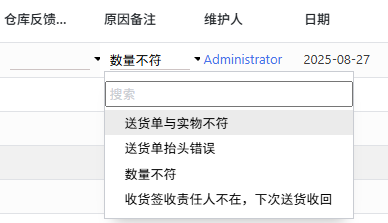
代码示例:
<field name="remark" widget="char_and_selection" options="{'optionList':[
'送货单与实物不符',
'送货单抬头错误',
'数量不符',
'收货签收责任人不在,下次送货收回']}"/>
TODO
- 支持下拉选择的选项从Model中查询。
字母自动大写
- version: odoo16
为方便用户快速输入,自动将英文输入转为大写。
upper_charfield.js
/** @odoo-module **/

import { registry } from "@web/core/registry";
import { CharField } from "@web/views/fields/char/char_field";

export class UpperCharField extends CharField {
    setup(){
        super.setup();
    }

    parse(value) {
        const valueUpper = value.toUpperCase();
        return super.parse(valueUpper);
    }
}

UpperCharField.template = "UpperCharField";

registry.category("fields").add("upper_char", UpperCharField);
upper_charfield.xml
<?xml version="1.0" encoding="UTF-8"?>
<templates xml:space="preserve">

    <t t-name="UpperCharField" owl="1" t-inherit="web.CharField" t-inherit-mode="primary">
        <xpath expr="//input" position="attributes">
            <attribute name="style">text-transform: uppercase;</attribute>
<!--            <attribute name="oninput">this.value = this.value.toUpperCase();</attribute>-->
        </xpath>
    </t>

</templates>